Create the appearance of old and damaged film, with multiple customizable elements including grain, stains, dust, scratches, projector shake and flicker and auto-defocus.
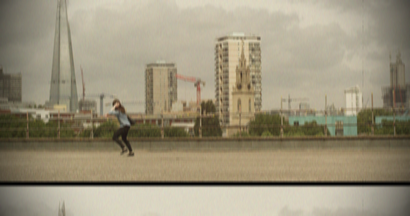
Film damage is split into several sections, each of which has its own controls. Each section can be turned on and off using the Enabled checkbox.
The Seed property can be used to generate a different result using the same overall settings.
Grain
Creates a grain pattern.
Item |
Description |
Amount |
Adjusts the visibility of the grain. |
Size |
Changes the size of each grain particle. |
Monochrome |
Switches between monochrome and colored grain. |
Stains
Adds splashes of dirt to the frame.
Item |
Description |
Quantity |
Changes the number of stains. |
Quantity Variation |
Adds a random element to ensure the exact same number of stains are not always on screen. |
Size |
Adjusts the size of the stains. |
Size Variation |
Adds a random element to the size, so that no two stains are the same size. |
Opacity |
Adjusts overall visibility of stains. |
Color |
Changes the color of the stains. |
Dust
Adds dust motes to the frame.
Item |
Description |
Quantity |
Changes the number of dust motes. |
Quantity Variation |
Adds a random element to ensure the exact same number of motes are not always on screen. |
Size |
Adjusts the size of the dust. |
Size Variation |
Adds a random element to the size, so that no two dust motes are the same size. |
Opacity |
Adjusts overall visibility of dust. |
Color |
Changes the color of the dust. |
Scratches
Adds vertical scratches to the frame.
Item |
Description |
Quantity |
Changes the number of scratches. |
Length/Width |
Changes the size of the scratches. |
Taper |
Causes the scratches to shrink at their ends. |
Color |
Changes the color of the scratches. |
Opacity |
Changes the overall visibility. |
Placement |
The scratches can be moved around the screen and the overall area affected can be adjusted using Area Width. |
Width Variation |
Adding width variation ensures that the scratches are not exactly the same width for their entire length. |
Weave Variation |
Adds a ripple to the scratch lines. |
Gaps |
Turns the solid scratch lines into dashed lines. |
Shake
Introduces a shake to the frame, as if the film is unstable within the projector.
Item |
Description |
Frequency/Amplitude |
Alters the size and intensity of the shake. |
Regularity |
Increases how frequently the shake occurs. |
Gap |
Widens the spacing between the top and bottom of the shifted frames. |
Blur |
Creates simulated motion blur as the frame is shifted. |
Vignette
Item |
Description |
Horizontal Stretch |
Stretches the vignetting horizontally. |
Vertical Stretch |
Stretches the vignetting vertically. |
Softness |
Adjusts the inner radius of the vignette. |
Curvature |
Adjusts the feathering of the vignette. |
Opacity |
Adjusts the visibility of the source. |
Background Opacity & Color |
Used to colorize the vignette border. |
Flicker
Adds an automatic flickering to the video during playback, as if it is being projected through an old projector.
Item |
Description |
Frequency/Amplitude |
Alters the intensity of the flickering. |
Randomness |
Adjust between a slow, regular flicker or a random, erratic flicker. |
Brightness |
Adjust the amount of potential light shift. |
Red/Green/Blue |
The flickering can also introduce an added color element, by adjusting these settings. |
Defocus
The video can be forced to occasionally lose focus.
Item |
Description |
Frequency/Amplitude |
Adjusts the regularity and behaviour of the defocusing. |
Randomness |
Adds a random element, so that each defocus event is slightly different. |