The TV damage filter creates distortion and interference similar to what is seen on a CRT television receiving a bad analogue transmission. The appearance of the TV damage is highly customizable and can also be used to simulate a low resolution computer monitor.
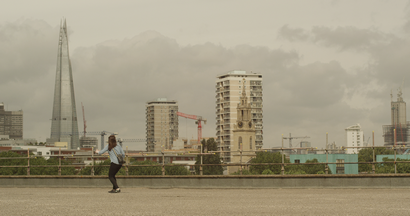
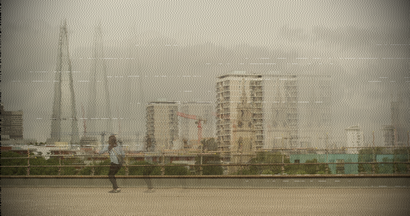
TV damage is split into several sections, each of which has its own controls. Each section can be turned on and off using the Enabled checkbox.
The Seed property can be used to generate a different result using the same overall settings.
Ghosting
Creates a 'ghost' image duplicate, offset from the main image.
Item |
Description |
Number of Ghosts |
Changes the number of ghost frames visible at once. |
Separation |
Distance between the ghost frames. |
Falloff |
Changes how quickly the ghost frames fade away. |
Radio interference
Creates rippling lines similar to radio interference on a screen.
Item |
Description |
Intensity |
Adjusts how visible the interference is. |
Angle |
Rotates the interference lines. |
Scale |
Changes the number of lines in the frame and their width. |
Frequency |
Alters the undulations in the distortion lines. |
Amplitude |
Adjusts the height of the undulations. |
Sharpness |
Changes between a sharp and blurred interference line. |
Angle |
Shifts the angle of motion. |
Speed |
Changes the speed of the interference movement. |
Vertical hold
Causes the entire frame to move up and down erratically.
Item |
Description |
Frequency |
Low frequencies create a less erratic, more controlled vertical movement. High frequencies create an erratic, frenzied movement. |
Regularity |
Higher regularity causes the vertical hold effect to occur more frequently. |
Gap |
Widens the spacing between the top and bottom of the shifted frames. |
Blur |
Creates simulated motion blur as the frame is shifted. |
Horizontal hold
Creates a horizontal, rippling distortion.
Item |
Description |
Frequency |
A higher frequency will create a more detailed distortion. |
Amplitude |
Higher amplitude creates a more obvious distortion. |
Regularity |
Higher regularity causes the horizontal hold effect to occur more frequently. |
Electrical interference
Generates horizontal banding/glitches.
Item |
Description |
Quantity |
Amount of interference visible at any one time. |
Width |
Adjusts the size of the interference. |
Color |
Changes the color of the interference. |
Center |
Used to relocate the interference within the frame. |
Area Width |
The interference can be compressed into a smaller space or spread out over a larger area. |
Amount |
The interference banding can be solid lines or dashed lines. |
Frequency |
Adjusts the pattern of dashed lines. |
Vignette
Item |
Description |
Horizontal Stretch |
Stretches the vignetting horizontally. |
Vertical Stretch |
Stretches the vignetting vertically. |
Softness |
Adjusts the inner radius of the vignette. |
Curvature |
Adjusts the feathering of the vignette. |
Opacity |
Adjusts the visibility of the source. |
Background Opacity & Color |
Used to colorize the vignette border. |
Monitor
Simulates a low resolution computer display.
Item |
Description |
Resolution |
Adjusts the vertical pixel resolution of the image. |
Width |
Changes the width of each pixel. |
Height |
Changes the height of each pixel. |
Shift Red/Green/Blue |
The red/green/blue components of each pixel can be separated out and default to being slightly offset from each other. |